Translate

Saturday, June 27, 2026

Setup of Transaction Types(Order Type) in Order Management Oracle EBS APPS R12

 Steps:

1. Creating a Line Transaction Type and validate Workflow
2. Creating an Order Transaction Type
3. Assigning Line flows to Order Transaction Type and validate Workflow
4. Creating a Document Sequence and check Document Categories
5. Assigning Document Sequence to the Order Transaction Type

Creating a Line Transaction Type:
Navigate to Order Management Super User Responsibility -> Setup -> Transaction Types -> Define. Transaction Types
window opens.
Select the Operating unit. Type the Transaction Type and Description.
Select Sales Document Type as Sales Order.
Select Order Category as Order. If you are creating a transaction type for Return, select Order Category as Return.
Select Transaction Type Code as Line.
Save the Record.


Creating an Order Transaction Type:
Navigate to Order Management Super User Responsibility -> Setup -> Transaction Types -> Define. Transaction Types
window opens.
Select the Operating unit. Type the Transaction Type and Description.
Select Sales Document Type as Sales Order.
Select Order Category as Mixed.
Select Transaction Type Code as Order. Fulfillment Flow as Order Flow-Generic
In the Main tab, select the Default Order Line Type. You can also select the price list which you want to default while
creating the order.


In the Shipping tab, select the Shipping Methods and Freight Terms.


In the Finance tab, select the Accounting Rule, Invoice Source, etc


Save the Record.
Assigning Line flows to Order Transaction Type:
Click Assign Work Flow Button in the Transaction Types window. Line Workflow Assignment window opens, Select the
Line Type and Process Name and Click OK.

Creating a Document Sequence:
Navigate to Order Management Super User Responsibility -> Setup-> Documents -> Define. Document Sequences
window opens.
Enter the Name, Application Name as Order Management, Date, Type as Automatic, Initial Value (It can be of any value
you want to start from)


Save the Record.
Assigning Document Sequence to the Order Transaction Type:
Navigate to Order Management Super User Responsibility -> Setup-> Documents-> Assign. Sequence Assignment
window opens.
In the Document tab, enter the Application Name as Order Management, Order Category created and Ledger.
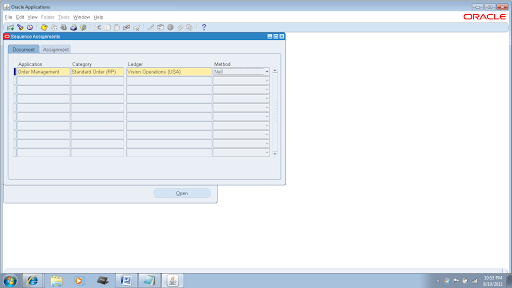
In the Assignment tab, enter the Application Name as Order Management, Order Category created and Sequence Created.

Save the Record.
Now you can check this by creating a Sales Order.
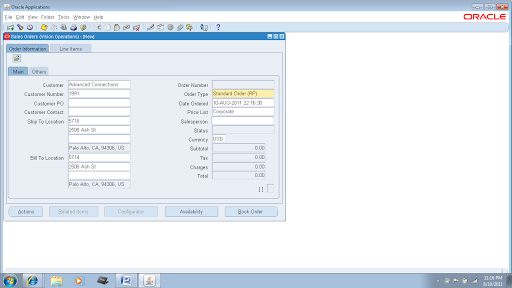
If you select the Order Type, you can see that the Price List is defaulted in the Main tab and Payment Terms, Shipping
Method and Freight Terms in the Others tab. Same way you can default many fields by selecting the same while creating
the Transaction Type

Also, you can see the Order Number as 1000 (which we have set as Initial Value while creating the Document Sequence).
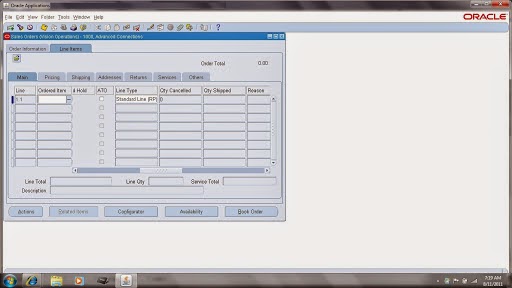
Also, in the Line tab you can see the Line Type corresponding to Order Type is defaulted.

Wednesday, June 24, 2026

How to create a employee by using hr employee API

CREATE OR REPLACE Procedure APPS.K_EMP11(errbuf   out varchar2,

                                    retcode  out varchar2) as

cursor c1 is select * from EMP_STAGE;

L_PID NUMBER(30);

l_AID NUMBER(30);

L_OVN NUMBER(9);

L_AOVN NUMBER(9);

L_ESD DATE;

L_EED DATE;

L_FULL_NAME VARCHAR2(100);

L_CID NUMBER(9);

L_AS NUMBER(9);

L_AN VARCHAR2(100);

L_CW  BOOLEAN;

L_PW BOOLEAN;

L_HW BOOLEAN;

L_EMPNO VARCHAR2(20);

l_bid number(9);

l_flag varchar2(1);

l_count number(9) default 0;

Begin

For x1 in c1 loop

l_count:=l_count+1;

l_flag :='A';

--Business Group ID Validation

Begin

select business_group_id

into   l_bid

from  HRFV_BUSINESS_GROUPS

where business_group_id = X1.BUSINESS_GROUP_ID;

Exception

When others then

l_flag :='E';

Fnd_File.put_line(Fnd_File.log,'Invalid Business Group ID'||'Record Number ='||l_count);

End;

If(l_flag !='E') then

HR_EMPLOYEE_API.CREATE_EMPLOYEE(p_validate                 => false

                                ,p_hire_date                => TRUNC(SYSDATE)

                                ,p_business_group_id       =>x1.BUSINESS_GROUP_ID

                                ,p_last_name                =>x1.last_name

                                ,p_sex                      =>x1.sex

                                ,p_person_type_id           =>x1.PERSON_TYPE_ID

                                ,p_date_of_birth            =>x1.DATE_OF_BIRTH

                                ,p_email_address            =>x1.email

                                ,p_employee_number          =>L_EMPNO

                                ,p_first_name               =>x1.first_name

                                ,p_marital_status          =>x1.MARITAL_STATUS

                                ,p_person_id               =>L_PID

                                ,p_assignment_id           =>L_AID

                                ,p_per_object_version_number    => L_OVN

                                ,p_asg_object_version_number    =>L_AOVN

                                ,p_per_effective_start_date    =>L_ESD

                                ,p_per_effective_end_date      =>L_EED

                                ,p_full_name                   =>L_FULL_NAME

                                ,p_per_comment_id              =>L_CID

                                ,p_assignment_sequence         =>L_AS

                                ,p_assignment_number           =>L_AN

                                ,p_name_combination_warning     =>L_CW

                                ,p_assign_payroll_warning       =>L_PW

                                ,p_orig_hire_warning            =>L_HW

                                ,p_national_identifier          => x1.SSID);

End If;

End Loop;

End;

/


How to find the secuity profile id by using the Organization Id in the Oracle Apps R12


select           psp.SECURITY_PROFILE_ID

                   ,psp.BUSINESS_GROUP_ID

                   ,psp.ORGANIZATION_ID

                   ,psp.SECURITY_PROFILE_NAME

from per_Security_profiles psp

        ,per_security_organizations pso

        ,hr_operating_units hou

where 1=1

and psp.SECURITY_PROFILE_ID = pso.SECURITY_PROFILE_ID

and pso.organization_id = hou.organization_id

and hou.organization_id = 202

and psp.BUSINESS_GROUP_ID = 81;

How to find the receipt details based on PO number in the Oracle Apps R12

This query is used to find the receipt details based on PO number.

SELECT  prh.segment1 "Req Number"

       ,prh.requisition_header_id

       ,prh.org_id "Req orgid"

       ,prh.creation_date

       ,prl.requisition_line_id

       ,prl.line_num

       ,prl.item_description "req line description"

       ,prd.distribution_id

       ,prd.set_of_books_id

       ,pda.po_distribution_id

       ,pla.po_line_id

       ,pla.line_num "Po Linenum"

       ,pha.segment1 "Po Number"

       ,pha.po_header_id

       ,as1.segment1 "Vendor Number"

       ,as1.vendor_name

       ,rt.TRANSACTION_TYPE

       ,rsl.shipment_line_id

       ,rsl.line_num "Shipment Linenum"

       ,rsl.shipment_line_status_code

       ,rsl.item_id

       ,rsl.source_document_code

       ,rsl.from_organization_id

       ,rsl.to_organization_id

       ,rsl.to_subinventory

       ,rsl.quantity_shipped

       ,rsl.quantity_received

       ,rsl.deliver_to_person_id

       ,rsl.item_description "Shipment lines Description"

       ,rsl.unit_of_measure

       ,rsh.receipt_num

       ,rsh.shipment_num


FROM    po_requisition_headers_All prh

       ,po_requisition_lines_All prl

       ,po_req_distributions_All prd

       ,po_distributions_all pda

       ,po_lines_all pla

       ,po_headers_all pha

       ,ap_suppliers as1

       ,rcv_transactions rt

       ,rcv_shipment_lines rsl

       ,rcv_shipment_headers rsh


WHERE 1=1

-- AND   prh.segment1              =  '143'

AND   prh.org_id                = 791

AND   prh.requisition_header_id = prl.requisition_header_id

AND   prl.requisition_line_id   = prd.requisition_line_id

AND   prd.distribution_id       = pda.req_distribution_id(+)

AND   pla.po_line_id            = pda.po_line_id       

AND   pha.po_header_id          = pla.po_header_id       

AND   pha.org_id                = 791                   

AND   pha.type_lookup_code      NOT IN ('RFQ','QUOTATION')

AND   pha.segment1 = '102'

AND   pha.vendor_id             = as1.vendor_id           

AND   pha.po_header_id          = rt.po_header_id         

AND   pla.po_line_id            = rt.po_line_id           

AND   pda.po_distribution_id    = rt.po_distribution_id   

AND   rt.organization_id        = 791                     

-- AND   prl.requisition_line_id    = rt.requisition_line_id(+)

AND  rt.shipment_line_id        = rsl.shipment_line_id   

AND  pha.po_header_id           = rsl.po_header_id         

AND  pla.po_line_id             = rsl.po_line_id           

AND  pda.po_distribution_id     = rsl.po_distribution_id     

AND  prd.distribution_id        = rsl.req_distribution_id   

-- AND  prl.requisition_line_id     = rsl.requisition_line_id(+)

AND  rsh.shipment_header_id     = rsl.shipment_header_id;  

How to find the receipt details based on requisition in the Oracle Apps R12

This query is used to find the receipt details based on requisition.

SELECT  prh.segment1 "Req Number"

       ,prh.requisition_header_id

       ,prh.org_id "Req orgid"

       ,prh.creation_date

       ,prl.requisition_line_id

       ,prl.line_num

       ,prl.item_description "req line description"

       ,prd.distribution_id

       ,prd.set_of_books_id

       ,pda.po_distribution_id

       ,pla.po_line_id

       ,pla.line_num "Po Linenum"

       ,pha.segment1 "Po Number"

       ,pha.po_header_id

       ,as1.segment1 "Vendor Number"

       ,as1.vendor_name

       ,rt.TRANSACTION_TYPE

       ,rsl.shipment_line_id

       ,rsl.line_num "Shipment Linenum"

       ,rsl.shipment_line_status_code

       ,rsl.item_id

       ,rsl.source_document_code

       ,rsl.from_organization_id

       ,rsl.to_organization_id

       ,rsl.to_subinventory

       ,rsl.quantity_shipped

       ,rsl.quantity_received

       ,rsl.deliver_to_person_id

       ,rsl.item_description "Shipment lines Description"

       ,rsl.unit_of_measure

       ,rsh.receipt_num

       ,rsh.shipment_num


FROM    po_requisition_headers_All prh

       ,po_requisition_lines_All prl

       ,po_req_distributions_All prd

       ,po_distributions_all pda

       ,po_lines_all pla

       ,po_headers_all pha

       ,ap_suppliers as1

       ,rcv_transactions rt

       ,rcv_shipment_lines rsl

       ,rcv_shipment_headers rsh


WHERE 1=1

AND   prh.segment1              =  '143'

AND   prh.org_id                = 791

AND   prh.requisition_header_id = prl.requisition_header_id

AND   prl.requisition_line_id   = prd.requisition_line_id

AND   prd.distribution_id       = pda.req_distribution_id(+)

AND   pla.po_line_id            = pda.po_line_id         

AND   pha.po_header_id          = pla.po_header_id         

AND   pha.org_id                = 791                     

AND   pha.type_lookup_code      NOT IN ('RFQ','QUOTATION')

-- AND   pha.segment1 = '102'

AND   pha.vendor_id             = as1.vendor_id             

AND   pha.po_header_id          = rt.po_header_id           

AND   pla.po_line_id            = rt.po_line_id             

AND   pda.po_distribution_id    = rt.po_distribution_id     

AND   rt.organization_id        = 791                       

-- AND   prl.requisition_line_id    = rt.requisition_line_id(+)

AND  rt.shipment_line_id        = rsl.shipment_line_id     

AND  pha.po_header_id           = rsl.po_header_id           

AND  pla.po_line_id             = rsl.po_line_id             

AND  pda.po_distribution_id     = rsl.po_distribution_id       

AND  prd.distribution_id        = rsl.req_distribution_id     

-- AND  prl.requisition_line_id     = rsl.requisition_line_id(+)

AND  rsh.shipment_header_id     = rsl.shipment_header_id; 

Supplier certification report in R12

In front end we can see the supplier certifications by following the below navigation


Navigation : Supplier Lifecycle Management –> Search for Supplier "%XX%" –> Click on the            Organization tab -> Click on Supplier Certification Tab


Query:

--------


SELECT  PSPE.PARTY_ID    PARTY_ID

       ,PSPE.C_EXT_ATTR1 CERTIFICATE

       ,PSPE.C_EXT_ATTR2 CERTIFICATE_NUMBER

       ,to_char(to_date(PSPE.D_EXT_ATTR3,'DD-MM-YY'),'DD-MON-YYYY') VALID_FROM

       ,to_char(to_date(PSPE.D_EXT_ATTR4,'DD-MM-YY'),'DD-MON-YYYY') VALID_THROUGH

       ,to_char(to_date(PSPE.D_EXT_ATTR5,'DD-MM-YY'),'DD-MON-YYYY') LAST_VALIDATED

       ,PSPE.REQUEST_ID  REQUEST_ID

       ,AS1.VENDOR_NAME  VENDOR_NAME

       ,AS1.SEGMENT1     VENDOR_NUMBER

FROM POS_SUPP_PROF_EXT_B PSPE

    ,AP_SUPPLIERS AS1

WHERE 1 = 1

  AND PSPE.attr_group_id=221

  AND to_date(PSPE.D_EXT_ATTR4,'DD-MM-YY') BETWEEN SYSDATE and SYSDATE+:P_EXP_DAYS

  AND AS1.PARTY_ID = PSPE.PARTY_ID

ORDER BY TO_DATE(PSPE.D_EXT_ATTR4,'DD-MM-YY')

        ,AS1.VENDOR_NAME

How to take backup of PLSQL objects programatically in Oracle Apps R12


This is package is used to take the backup of the PLSQL objects.


create or replace PACKAGE XX_WRITE_FILES_PKG

IS


PROCEDURE XX_WRITE_FILES_PRC(P_OBJECT_NAME IN VARCHAR2);


PROCEDURE MAIN;


END XX_WRITE_FILES_PKG;

/

SHO ERRORS

/


create or replace PACKAGE BODY XX_WRITE_FILES_PKG

IS


-- |                                                                             |

-- |Description      : XX_WRITE_FILES_PKG is used to take the backup of          |

-- |                   Database objects like PROCEDURE,PACKAGE BODY,PACKAGE      |

-- |                   TYPE BODY,TRIGGER,FUNCTION,TYPE.                          |


PROCEDURE Debug( p_message  IN  VARCHAR2

               ) IS

lv_message       VARCHAR2(200);


BEGIN


      lv_message    := SUBSTR(p_message,1,240);

       fnd_file.put_line(fnd_file.log, lv_message);

   -- dbms_output.put_line(lv_message);


END Debug;


-- +====================================================================+

-- | Name             : write_out                                       |

-- | Description      : To write to the Output file of a concurrent Prog|

-- | Parameters       : pv_mesg            - Message String             |

-- |                                                                    |

-- +====================================================================+

PROCEDURE write_out(pv_mesg  IN  VARCHAR2) IS

BEGIN


    FND_FILE.PUT_LINE( FND_FILE.OUTPUT, substr(pv_mesg,1,500));

   --  dbms_output.put_line(substr(pv_mesg,1,500));


END write_out;


PROCEDURE XX_WRITE_FILES_PRC (P_OBJECT_NAME IN VARCHAR2)

IS


CURSOR lcu_file_name (cv_object_name VARCHAR2)

IS

SELECT text

FROM   user_source

WHERE NAME = cv_object_name;


l_file  UTL_FILE.FILE_TYPE;


BEGIN


Debug('XX_WRITE_FILES_PRC => Begining of Procedure');


l_file := UTL_FILE.FOPEN('/usr/tmp',P_OBJECT_NAME||'.TXT','W');


Debug('XX_WRITE_FILES_PRC => After opening file '||P_OBJECT_NAME||'.TXT');

FOR lr_file_name_rec IN lcu_file_name(P_OBJECT_NAME) LOOP


UTL_FILE.PUT_LINE(l_file,lr_file_name_rec.TEXT);

END LOOP;

Debug('XX_WRITE_FILES_PRC => After closing the for-loop lr_file_name_rec');


UTL_FILE.FCLOSE(l_file);

Debug('XX_WRITE_FILES_PRC => End of procedure');


EXCEPTION

WHEN OTHERS THEN

Debug('XX_WRITE_FILES_PRC error at processing backup file for object '||P_OBJECT_NAME);

Debug('XX_WRITE_FILES_PRC => Error: '||SQLCODE ||','||SQLERRM);

END XX_WRITE_FILES_PRC;


PROCEDURE MAIN (ERRBUF  OUT VARCHAR2

               ,RETCODE OUT VARCHAR2)

IS


CURSOR lcu_object_name

IS

SELECT  xbon.OBJECT_NAME

FROM    XX_BKUP_OBJECT_NAMES xbon;


BEGIN


Debug('MAIN => Begining of PROCEDURE');


FOR lr_object_name IN lcu_object_name LOOP

Debug('MAIN => Entered into for-loop lr_object_name');


XX_WRITE_FILES_PRC(lr_object_name.OBJECT_NAME);

write_out('Backup file created for object '||lr_object_name.OBJECT_NAME);

END LOOP;

Debug('MAIN => End of PROCEDURE');


EXCEPTION

WHEN OTHERS THEN

Debug('MAIN => Error: '||SQLCODE ||','||SQLERRM);

END MAIN;


END XX_WRITE_FILES_PKG;

/

SHO ERRORS

/

Vendor creation by using API in Orale Apps R12

DECLARE

   l_vendor_rec       ap_vendor_pub_pkg.r_vendor_rec_type;

   l_return_status   VARCHAR2(10);

   l_msg_count       NUMBER;

   l_msg_data         VARCHAR2(1000);

   l_vendor_id        NUMBER;

   l_party_id           NUMBER;

   cursor c1 is select * from xx_sup_stage;

BEGIN

   -- --------------

   -- Required

   -- --------------

   for i in c1 loop

   l_vendor_rec.VENDOR_ID:= i.VENDOR_ID;

   l_vendor_rec.VENDOR_NAME:= i.VENDOR_NAME;

   l_vendor_rec.VENDOR_NAME_ALT:=i.VENDOR_NAME_ALT;

   l_vendor_rec.SEGMENT1:= i.SEGMENT1;

   l_vendor_rec.SUMMARY_FLAG:=i.SUMMARY_FLAG;

   l_vendor_rec.ENABLED_FLAG:=i.ENABLED_FLAG;

   l_vendor_rec.TERMS_ID:=i.TERMS_ID;

   l_vendor_rec.PAY_DATE_BASIS_LOOKUP_CODE:=i.PAY_DATE_BASIS_LOOKUP_CODE;

   l_vendor_rec.PAY_GROUP_LOOKUP_CODE:=i.PAY_GROUP_LOOKUP_CODE;

   l_vendor_rec.INVOICE_CURRENCY_CODE:=i.INVOICE_CURRENCY_CODE;

   l_vendor_rec.PAYMENT_CURRENCY_CODE:=i.PAYMENT_CURRENCY_CODE;

   l_vendor_rec.START_DATE_ACTIVE:=i.START_DATE_ACTIVE;


   -- -------------

   -- Optional

   -- --------------

   l_vendor_rec.match_option  :='R';


   pos_vendor_pub_pkg.create_vendor

   (    -- -------------------------

        -- Input Parameters

        -- -------------------------

        p_vendor_rec      => l_vendor_rec,

        -- ----------------------------

        -- Output Parameters

        -- ----------------------------

        x_return_status   => l_return_status,

        x_msg_count       => l_msg_count,

        x_msg_data         => l_msg_data,

        x_vendor_id        => l_vendor_id,

        x_party_id           => l_party_id

   );


   IF l_return_status ='S' THEN

  -- Update vendor id in stage tables through autonomus prrogram.


   ELSE

   -- Update vendor id in stage tables through autonomus prrogram.

  End if;


  end loop;


  commit;


EXCEPTION

      WHEN OTHERS THEN

                   ROLLBACK;

                   DBMS_OUTPUT.PUT_LINE(SQLERRM);

END;

/

Outside Processing Setups and Cycle in Oracle EBS R12

  OSP Cycle This post is about Oracle Outside Processing Cycle. Outside processing is used when we don't have in house resources to comp...